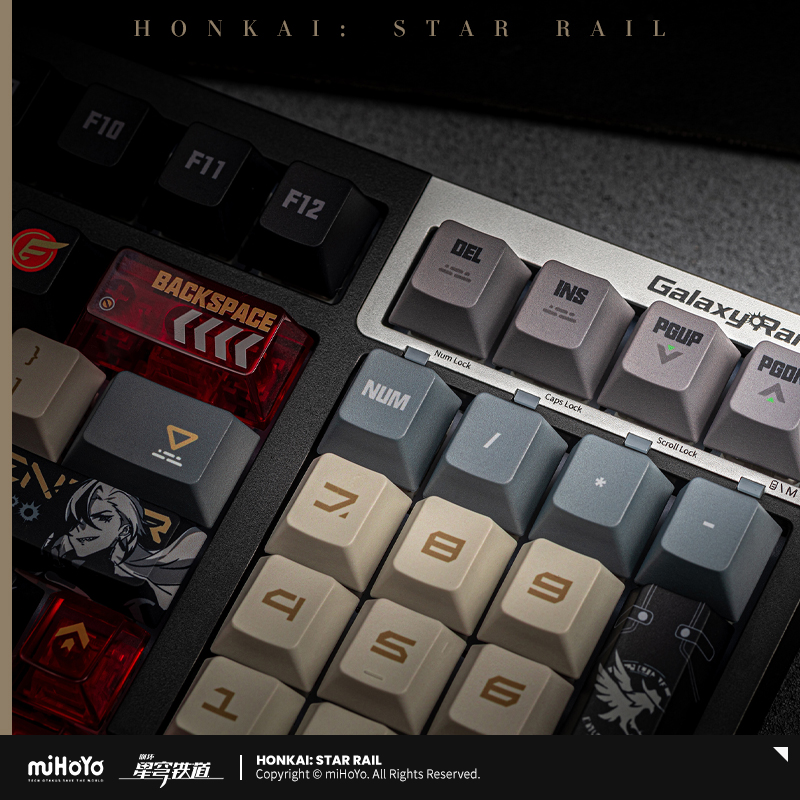
【Pre-Order】Honkai: Star Rail - Boothill: His Favorite Mechanical Keyboard
【Pre-Order】Honkai: Star Rail - Boothill: His Favorite Mechanical Keyboard
Regular price
$165.49 USD
Regular price
$0.00 USD
Sale price
$165.49 USD
Unit price
per
Tax included.
Shipping calculated at checkout.
Couldn't load pickup availability
INFO
Package Contents: Keyboard / Dust Cover/ 2.4G receiver/ Keycap and switch puller / Extra keycaps(Boothill Theme) / User manual / Warranty Card
- 97 keys wireless mechanical keyboard
- Dimensions: Approx. 387.8 × 143 x 40.8 mm
- Keycap Process: Five-sided dye sublimation for all keys
- Material:
- Keyboard: ABS
- Keycaps: PBT
- Clear kaycaps(13 Pcs): PC
- Feet: Dual-stage adjustable feet
- Backlight Mode: 16M-color RGB adjustable
- Switch Options: Red Switch & Frost Sakura Switch
- Switch Base: FL CMMK
- Connectivity: Wireless Bluetooth 5.0 / Wireless 2.4G / Type-C
- System Compatibility: Windows/ macOS / Android
- Note: The receiver is stored in the compartment beneath the right foot stand on the back of the keyboard.
-
2.4GHz Wireless Connection: 1, Remove the receiver from the storage. 2, Insert the receiver into a USB-A port on your computer. 3, Slide the mode toggle switch on the bottom to the "2.4G" position.
- Bluetooth Connection: 1, Slide the mode switch on the bottom to the Bluetooth position. 2, To enter pairing mode, press and hold Fn + 1, 2, or 3. the indicator light below the selected number key will flash rapidly during pairing. 3, The device supports pairing with up to 3 devices. Press Fn + 1, 2, or 3 to switch between your paired devices.
- Notice: When the host device's Bluetooth adapter is version 4.0 or higher, both "BT5.0KB" and "BT3.0KB" will appear in the pairing list. Please select "BT5.0KB" for optimal performance.
If the host's Bluetooth adapter is below version 4.0, only "BT3.0KB" will be discoverable. In this case, select "BT3.0KB" to proceed. - Wired Connection: 1, Insert the provided USB-C cable into the port on the keyboard. 2, Connect the other end of the cable to your computer. 3,
- Slide the mode switch on the bottom to the center position, labeled as the Wired mode.
- MiHOYO Official Product
- Expected Dispatch Date: April, 2026
Shipping & Delivery
- Please note the following: DELIVERY TIME = PROCESSING TIME (after item released) + SHIPPING TIME
- Typically, all in-stock orders are processed within 5-7 business days, and shipping takes an additional 10-15 business days, not including weekends and holidays.
-
Rest assured, we are committed to dispatching your order as quickly as possible.
- Visit Shipping Policy for details.
Refund
- We have a 15-day return policy only for extremely special cases,please see Refund Policy.