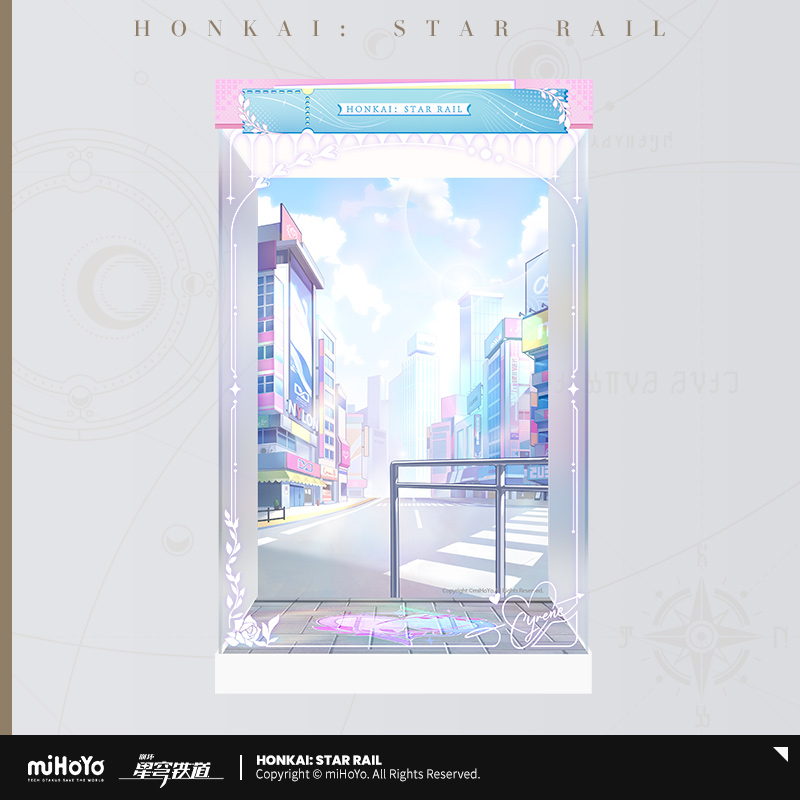
【Pre-Order】Honkai: Star Rail - Gift+ Series Wonderful Holiday Ver. Cyrene 1/8 Scale Figure Display Case
【Pre-Order】Honkai: Star Rail - Gift+ Series Wonderful Holiday Ver. Cyrene 1/8 Scale Figure Display Case
Series:
Honkai:Star Rail
Officially licensed by miHoYo
Regular price
$50.49 USD
Regular price
$0.00 USD
Sale price
$50.49 USD
Unit price
per
Tax included.Shipping calculated at checkout.
Couldn't load pickup availability
*Note: The display case only. The figure must be purchased separately.
INFO
- Standard Case:
- Material: Acrylic
- Inner Dimensions: approx. 184×160×270mm, Outer Dimensions: approx. 194×170×295mm
- Deluxe Case
- Material: Acrylic, LED
- Inner Dimensions: approx. 184×160×270mm, Outer Dimensions: approx. 194×170×320mm
- 1 light on top, 3 colors
- Accessories:
- Deluxe Version – Acrylic knife, cotton gloves, 3mm edge sealing strip, silicon pad
- Standard Version – Acrylic knife, cotton gloves, 3mm edge sealing strip, silicon pad.
- Release Date: Oct 2026 (The product is expected to be delivered within 180 days after its official release)
- MiHOYO Official Product
Assembly Instructions
-
Contents:
- Deluxe Version: Top panel / Side view of top panel / Back panel / Bottom light panel/Side panels ×2 / Front panel
- Standard Version: Top panel / Bottom panel / Back panel/Side panels ×2 / Front panel
-
Steps:
1. Please note that all acrylic panels have a protective film on both sides. Remove the film before assembly. If the surface appears matte or has visible scratches, it means the film is still attached.
2. Assemble the side panels as shown in the diagram. Secure the lower edge of each side panel into the grooves of the bottom panel. Ensure all connected parts are tightly aligned.
3.Place the top panel to complete the assembly.
4. The display box of this product is designed with a snap-fit assembly structure. Once assembled, the acrylic panels form an integrated structure. When performing routine maintenance or handling, simply lift it up.
5.Deluxe Edition: Please note that after assembling the illuminated display, the light module must be connected and powered separately using a Type-C power source (not included). Connect the power cable to the Type-C port located behind the top light panel. Press the switch briefly to cycle through three lighting colors. Press and hold to adjust brightness continuously. Please use a USB-to-Type-C cable for power supply.